A legacy unified communications platform for businesses
Microsoft Lync is a business-focused unified communications client launched in 2010 as the successor to Microsoft Office Communicator. It combined instant messaging, audio and video calling, and online meetings in one interface, with tight integration into Microsoft Office applications such as Outlook, Word, and PowerPoint. While still usable in certain on-premises deployments, Lync has been officially discontinued and replaced by Skype for Business, which itself has largely transitioned to Microsoft Teams.
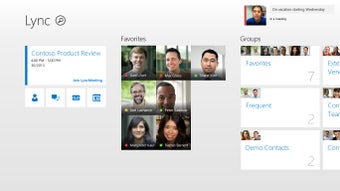
It was designed to streamline business communication, reducing reliance on separate phone systems while providing presence indicators, file transfer, and screen sharing. These tools allowed teams to connect quickly, improving collaboration across different locations.
Collaboration tools with Microsoft ecosystem integration
Microsoft Lync provided a broad range of communication features, including VoIP voice calls, HD video conferencing, group chat, and desktop or application sharing. Presence indicators displayed real-time availability, helping reduce email clutter by encouraging instant, direct communication between colleagues. Users could send files directly through the client, initiate meetings without leaving their current document or inbox, and maintain threaded discussions for ongoing projects.
Integration with Microsoft Office was a key strength—users could schedule Lync meetings from Outlook, view contact status in Word or Excel, and co-author documents during live sessions for faster decision-making. Lync also supported federation with other organizations and could integrate with enterprise telephony systems for PBX replacement, bridging traditional phone infrastructure with modern VoIP services. However, while functional, Lync’s interface was designed for practicality over modern aesthetics, and performance in very large meetings could depend heavily on network stability and server configuration.
Today, Lync is no longer supported for updates or security patches outside of extended enterprise agreements. It remains operational only in environments running legacy Lync Server or compatible Skype for Business Server installations, making it primarily a tool for organizations maintaining established infrastructure rather than new deployments.
A discontinued but still functional business communication tool
Microsoft Lync offers a feature set that remains useful for organizations still running legacy systems. Its real-time messaging, conferencing, and Office integration once made it a competitive collaboration platform. However, with its official support ended and Microsoft now focused on Teams, it is best suited for businesses maintaining older infrastructure rather than new deployments.